> ## Documentation Index
> Fetch the complete documentation index at: https://docs-v1.agno.com/llms.txt
> Use this file to discover all available pages before exploring further.
# Monitoring & Debugging
> Monitor your Agents, Teams and Workflows in real-time.
# Monitoring
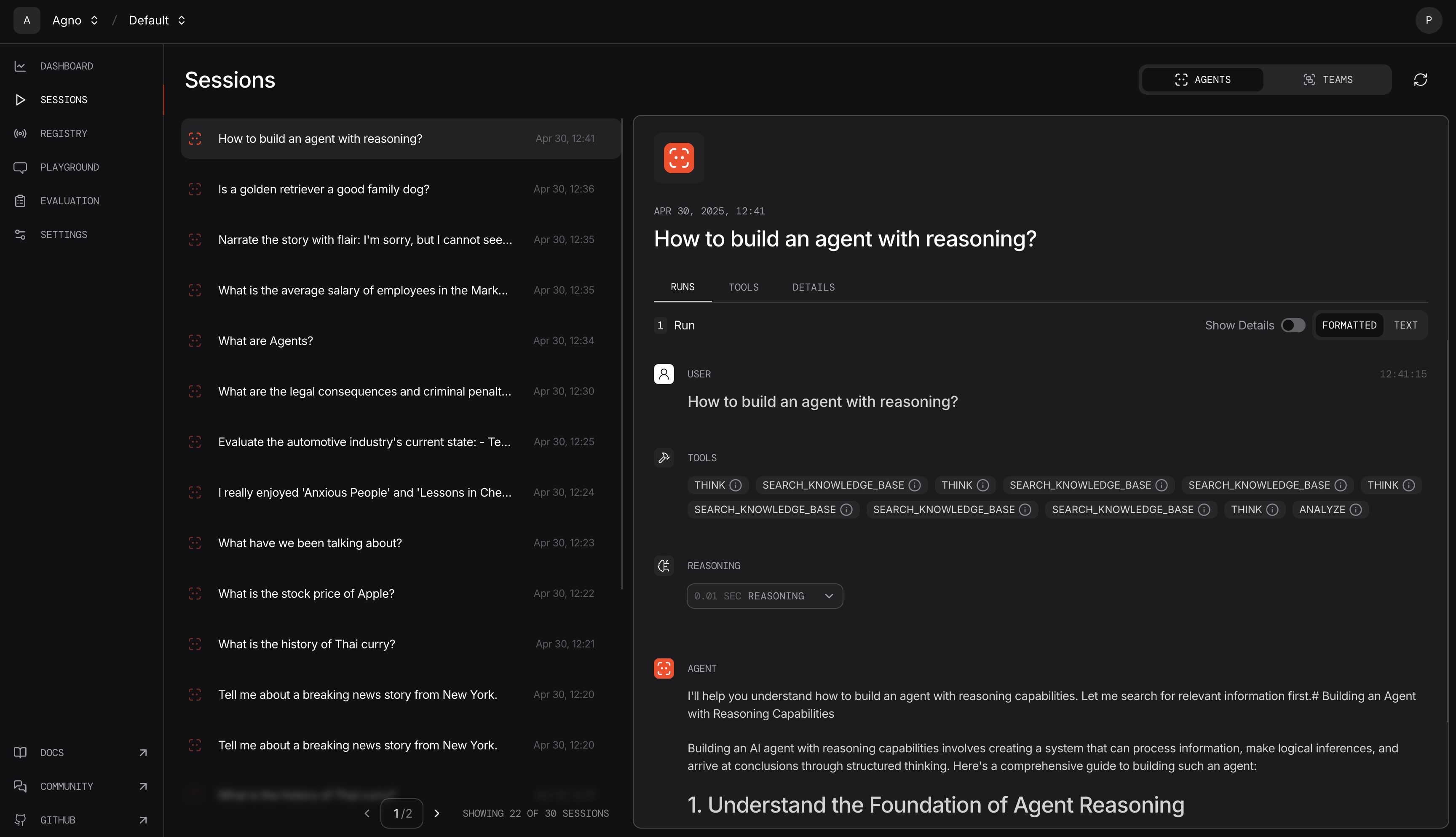
You can track your Agent in real-time on [app.agno.com](https://app.agno.com).
## Authenticate
Authenticate with [agno.com](https://app.agno.com) to start monitoring your sessions.
Check out [Authentication guide](/how-to/authentication) for instructions on how to Authenticate with Agno.
## Enable Monitoring
Enable monitoring for a single agent or globally for all agents by setting `AGNO_MONITOR=true`.
### For a Specific Agent
```python theme={null}
agent = Agent(markdown=True, monitoring=True)
```
### Globally for all Agents
```bash theme={null}
export AGNO_MONITOR=true
```
## Monitor Your Agents
Run your agent and view the sessions on the [sessions page](https://app.agno.com/sessions).
```python monitoring.py theme={null}
from agno.agent import Agent
agent = Agent(markdown=True, monitoring=True)
agent.print_response("Share a 2 sentence horror story")
```
```shell theme={null}
python monitoring.py
```
View your sessions at [app.agno.com/sessions](https://app.agno.com/sessions)
 Facing issues? Check out our [troubleshooting guide](/faq/cli-auth)
## Debug Logs
Want to see the system prompt, user messages and tool calls?
Agno includes a built-in debugger that will print debug logs in the terminal. Set `debug_mode=True` on any agent or set `AGNO_DEBUG=true` in your environment.
```python debug_logs.py theme={null}
from agno.agent import Agent
from agno.models.anthropic import Claude
from agno.tools.duckduckgo import DuckDuckGoTools
agent = Agent(
model=Claude(id="claude-sonnet-4-20250514"),
tools=[DuckDuckGoTools(search=True, news=True)],
instructions="Use tables to display data. Don't include any other text.",
markdown=True,
debug_mode=True,
)
agent.print_response("What is the latest news about technology?", stream=True)
```
Run the agent to view debug logs in the terminal:
```shell theme={null}
python debug_logs.py
```
## Telemetry
Agno logs which model an agent used so we can prioritize updates to the most popular providers. You can disable this by setting `AGNO_TELEMETRY=false` in your environment.
```bash theme={null}
export AGNO_TELEMETRY=false
```
Facing issues? Check out our [troubleshooting guide](/faq/cli-auth)
## Debug Logs
Want to see the system prompt, user messages and tool calls?
Agno includes a built-in debugger that will print debug logs in the terminal. Set `debug_mode=True` on any agent or set `AGNO_DEBUG=true` in your environment.
```python debug_logs.py theme={null}
from agno.agent import Agent
from agno.models.anthropic import Claude
from agno.tools.duckduckgo import DuckDuckGoTools
agent = Agent(
model=Claude(id="claude-sonnet-4-20250514"),
tools=[DuckDuckGoTools(search=True, news=True)],
instructions="Use tables to display data. Don't include any other text.",
markdown=True,
debug_mode=True,
)
agent.print_response("What is the latest news about technology?", stream=True)
```
Run the agent to view debug logs in the terminal:
```shell theme={null}
python debug_logs.py
```
## Telemetry
Agno logs which model an agent used so we can prioritize updates to the most popular providers. You can disable this by setting `AGNO_TELEMETRY=false` in your environment.
```bash theme={null}
export AGNO_TELEMETRY=false
```